Future-Friendly through Intelligent Content
Association for contemporary art <rotor>
Content Strategy
UX Design
UI Design
PROJECT TYPE: Website redesign
ROLE: Content strategist + UX/UI designer
INDUSTRY: Culture, Art
TOOLKIT: MAXQDA, Figma, Miro, Adobe Indesign, pencil & paper
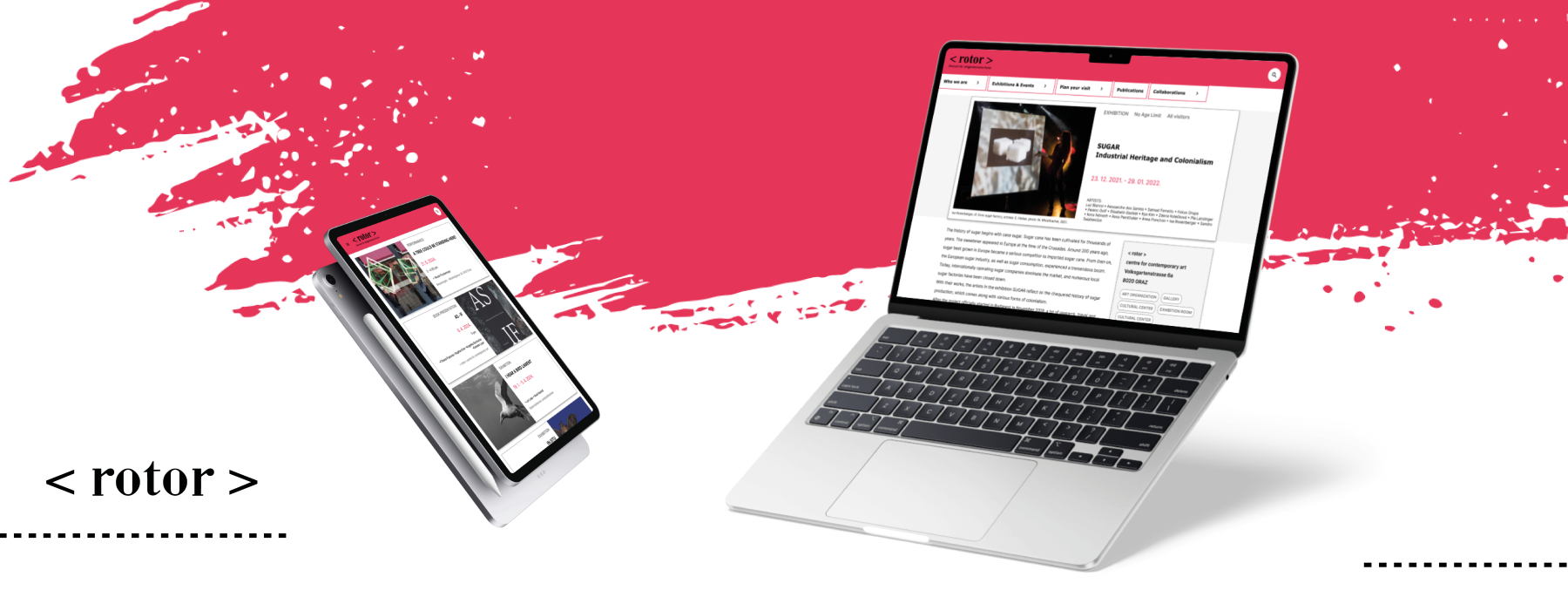
OVERVIEW: From the back-end content strategy to the component-based modular UI.




Introduction
Rotor is a non-profit organization, a small tax-exempt organization seeking to fulfill a specific community need. As a public art organization, Rotor strives to present contemporary art to a broad public by organizing contemporary art exhibitions and other related activities throughout the year.
The business problem
After meeting with the key representatives of Rotor and identifying the SWOT factors, the organization’s business problem became clear;
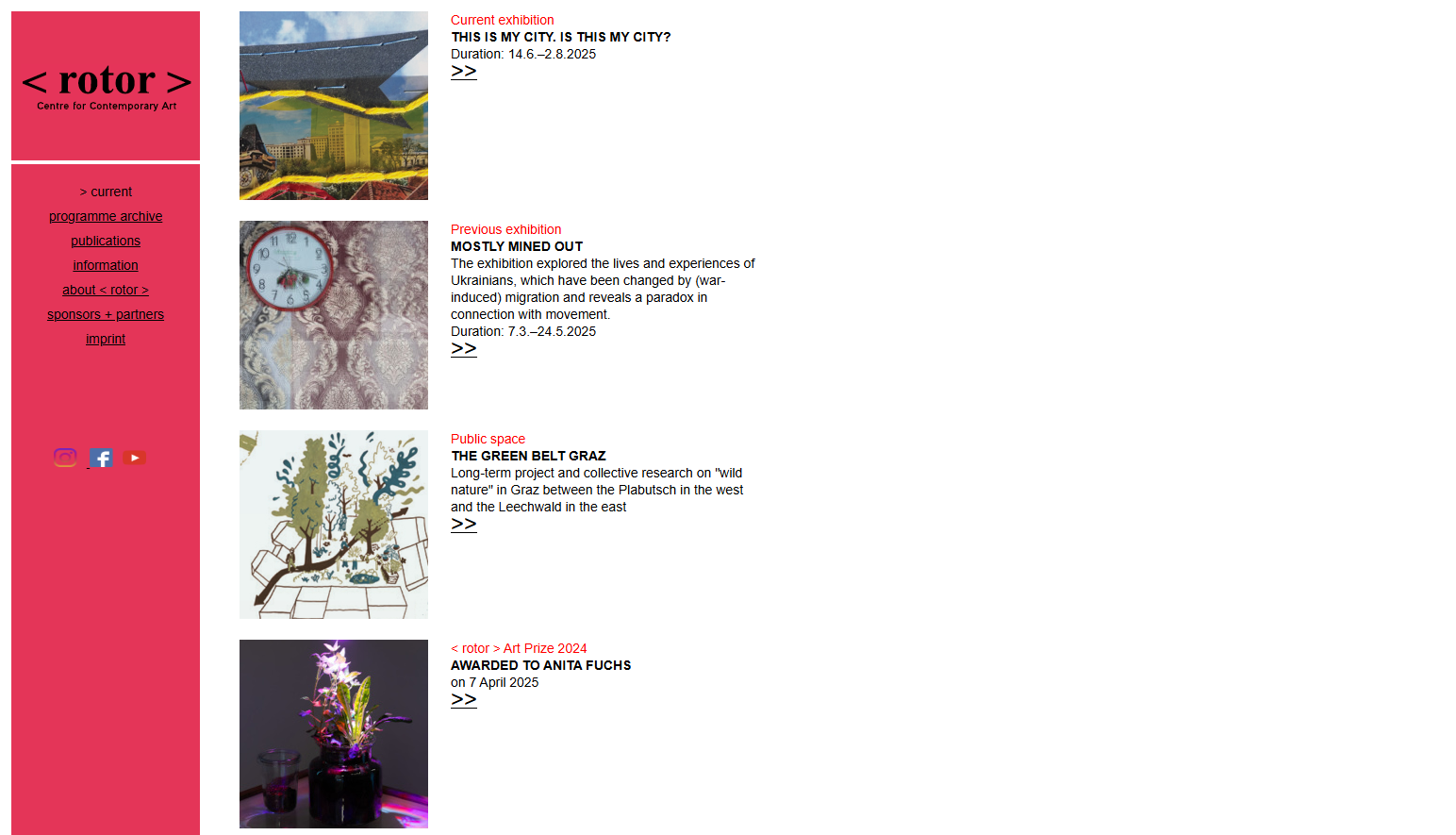
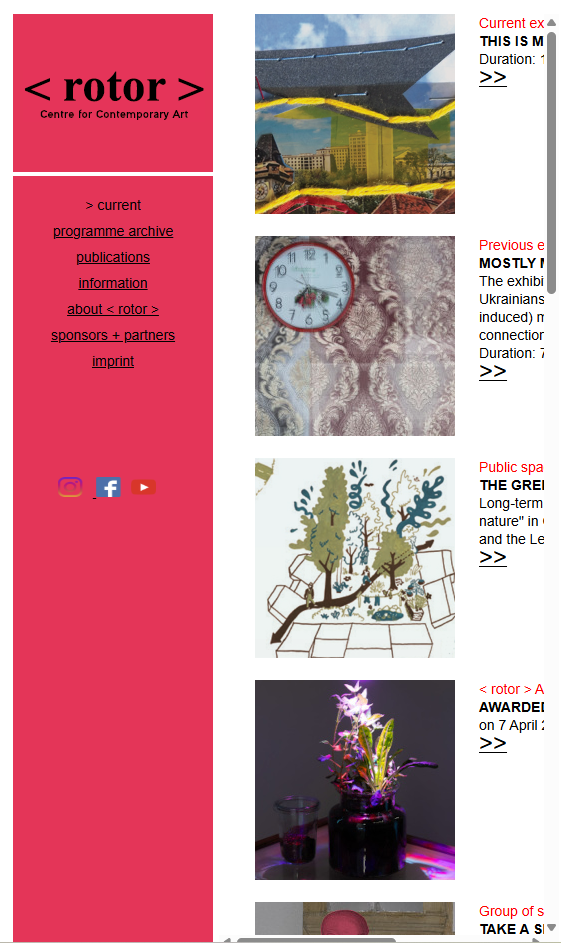
The visibility of Rotor’s activities is limited, primarily due to its weak online presence. This includes an outdated, page-centric website and poor use of social media.

The UI before the redesign
Objectives and business goals
The core business objective of Rotor is to win more visitors and this goal can be achieved by considering key business priorities which are;
- to raise awareness about contemporary art,
- to build up permanent contact with users and systematically follow their needs,
- to make contemporary art a more participatory experience,
- to increase audience engagement,
- to reach new audiences,
- to increase attendance at events,
- to strengthen the visibility of Rotor in the city of Graz, on the national and international scene,
- to improve communication with patrons and audiences.
Business requirements
With the help of Rotor’s key representatives, the business requirements were identified.

Increase visitor numbers, both on and offline
In the last decades, this means the number of people who visit the organization and its activities and the number of users that visit the website.
One of the requirements is to clearly define the target audience and implement a solid monitoring and web analytics system when planning a new product.
This will provide a better understanding of users and their behavior when visiting the organization’s website.

Align content with the needs of users and other stakeholders
The next requirement is to create a content model based on insights gained from the user research. The content model will be derived from the domain model, which maps Rotor’s area of expertise and will help effectively address the needs and expectations of its audience.
The structured content from the content model will serve as the foundation for developing a well-designed user-friendly interface.

Affect art advocacy and fulfill the educational mission
Therefore, Rotor should ensure that content is relevant, accurate, and accessible.
To achieve this, the organization will implement “intelligent” content, making it easily discoverable and accessible for users while aligning with Rotor’s business objectives.
Modular and structured content will enhance audience reach across different platforms, effectively promoting Rotor’s mission.

Solution
To establish a strong and consistent digital presence by developing a long-lasting, well-structured, website that meets the needs of visitors and other involved stakeholders.
The solution can be achieved by meeting a set of key goals:
- Designing connected content based on a content model derived from the domain model and informed by user research.
- Developing “intelligent” content that is modular, structured, reusable, format-free, and semantically rich, ensuring discoverability, reconfigurability, and adaptability.
- Implementing the content model and “intelligent” content approach into the website’s UI design.
DISCOVER
UX RESERACH
Quantitative Content Inventory
The first phase of the research was focused on gathering a reference for existing content to keep track of what to work with for the further content development. For this purpose, a content inventory was carried out.
Learnings
The quantitative content inventory analysis identified issues related to the outdated HTML version of the website, content accessibility, findability, content structure, and SEO.
While it revealed a rich archive of past activities, it also highlighted difficulties in tracking existing categories and searching through them due to page-centric content production. Additionally, the content structure and information architecture were found to be unclear and not intuitive for users.
User Research
The second part of the research was focused on exploring the needs of Rotor’s target groups, providing an in-depth look at how they engage with digital media and content. The primary goal was to understand how people perform tasks and achieve goals that matter to them. A descriptive method of Ethnography, classified as qualitative research, was employed and conducted through semi-structured interviews.
Learnings
The user research provided a clear analysis of the target users’ needs, identifying the development of a content model for Rotor’s web presence as the most critical next step in the website relaunch. It highlighted the necessity of defining structured content to improve search engine rankings and provide better accessible and easily findable on-page content for all Rotor’s target groups.
The process of the Qualitative User Research:

DEFINING TARGET GROUPS
Before starting the user research and conducting interviews with representatives of Rotor’s target audience, 3 primary target audiences were identified:
1. Artists – stakeholders interested in Rotor’s activities and how to apply for an exhibition or art residence at Rotor.
2. Other art organizations & sponsors – stakeholders interested in Rotor activities, collaborations, and projects.
3. Interested community – the broader society and the general public.

PROBLEM DEFINITION
The user research began by defining the key questions to be answered. Once the questions were derived, the next step was to formulate the research problem statement (RPS) for each target group to describe the topic and goals of my user research. The intention was to identify WHAT I wanted to find out.
In the next phase, I drafted a brief description of the study, summarizing the previously defined research questions and research problem statements:
“I will describe how contemporary visual artists, representatives of art organizations/sponsors and general audience interested in contemporary art use digital media to get information about novelties, news, visual art activities and contemporary art exhibition, how they use digital media to perform specific tasks, what content is important to them and what are their habits toward the usage of digital devices.“

APPROACH SELECTION
Based on what I wanted to find out I defined HOW to do it:
Since my research problem statements were focused on questions about users and aimed to gain insights into the reasons and motivations behind their actions, I chose to conduct a descriptive user research or Ethnography, classified as qualitative research, using semi-structured interviews.

PREPARING & CONDUCTING THE RESEARCH
The next step was to recruit representatives of each target group. After recruiting at least 5 respondents per target group, the preparation for the research proceeded by defining interviews’ guidelines.

DATA COLLECTION
After conducting the interviews, the next phase involved transcribing all the interviews to collect the data and begin the analysis.

DATA ANALYSIS & THE CASE STUDY
The data analysis process began with the development of categories for the analysis, followed by the application of the deductive method. The goal was to clearly define which parts belonged to each category, ensuring the collection of meaningful data for further reporting and the development of a relevant case study.
The categories were designed to address the initial research questions and provide insights into users’ behaviors and habits.
The analysis was performed by MAXQDA, a software package for qualitative and mixed methods research. The process unfolded as follows:
1. Following the development of categories for analysis, a coding guide – Codebook was created, and the entire transcribed material was coded accordingly.
2. After coding the entire material, the interviews’ retrieved segments per each category were compiled.
3. Based on these segments a case record in the form of summary tables with deduced conclusions – affinity diagrams was created by each category per target group.
4. Based on the case records, the final case analysis was conducted, and the case study was written.
Defining User Personas
The research phase involved defining user archetypes for each target group to capture the unique characteristics of their specific audiences. By conducting interviews with real individuals and analyzing the results, patterns emerged that helped create credible personas.
#Persona 1 Contemporary artist

“Before planning my presentation, I like to explore the exhibition spaces. I usually visit the organizer’s website to view the venue and check images from past exhibitions.”
Moira Kraus
40 y/o, independent visual artist from Salzburg.
Role
She has been working as a lecturer at the Art University Linz since 2015.
Technology and Skills



She uses a desktop at home or university, a laptop on the train, and her phone for leisure and quick info checks.
Scenario
Moira is planning a new exhibition and seeking the best opportunity to present her artworks. She is looking for a prestigious art organization to collaborate with renowned art experts and curators.
Behaviors & Habits
- Curators usually invite her for exhibitions, though she sometimes explores opportunities herself.
- Before planning, she reviews past artists and curators.
- To confirm an exhibition, she needs to understand the organization’s program orientation.
Goals
- Exhibit in renowned contemporary art galleries.
- Advance her career and reputation as an independent artist.
- Collaborate with experts and grow her network.
- Promote her work.
- Pursue excellence in her artistic practice.
#Persona 2 Art Curator
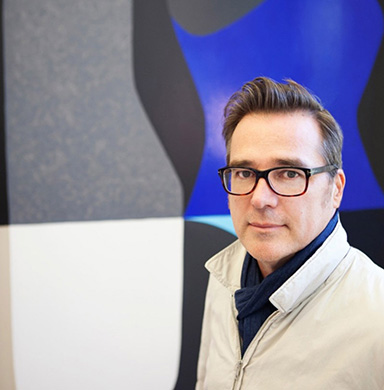
„Working 20 years in the field, you know all the people who are important players. You simply know a lot, but sometimes you need to go deeper into the artist’s work or the activities of an institution … so you go on the website for more information.“
Stefan Weiss
47 y/o, art curator and art critic from Wiena.
Role
He is an independent artist-curator and critic, writing catalog essays, exhibition reviews, and critical analyses.
Technology and Skills
He works on a laptop at home and uses his phone on the go, spending around 8 hours online daily. A skilled digital user, he mainly uses Instagram and Facebook.
Scenario
Stefan is working on a group exhibition highlighting Vienna’s contemporary art scene. He’s bringing together key artists and plans to publish an accompanying catalog. To present the show in a respected contemporary art space, he’s looking for a project partner with shared values and artistic vision.
Behaviors & Habits
- He researches art organization websites for details on activities, exhibitions, and publications.
- When looking for a project partner, he prioritizes those with a similar focus on contemporary art and reviews their past work.
- He believes capturing attention is essential today, with strong visual design playing a key role.
Goals
- Collaborate with professional contemporary art organizations, institutions, and galleries.
- Showcase contemporary art practices and renowned artists.
- Support emerging artists in their career development.
- Pursue excellence in contemporary art and the evolution of new ideas and theories.
#Persona 3 Student

“I visit art exhibitions to gain new perspectives on social and aesthetic issues, among others, on various levels. Otherwise, I am a fact-oriented person. I study and work in journalism, which is just one part of the world.”
Anna-Lisa Lang
26 y/o, Master’s student in Journalism & Media at the University of Hamburg.
Role
She works as a part-time columnist for a regional newspaper.
Technology and Skills
She is tech-savvy, using her laptop for work and studies and staying online most of the day. Her phone is part of her routine, mainly for checking social media and staying updated on news.
Scenario
Anna Lisa is looking for a contemporary art exhibition that challenges her thinking, offers new perspectives, and speaks to her personal questions. Seeking to balance her fact-filled daily routine, she wants to focus more on her emotional needs and plans to visit an exhibition.
Behaviors & Habits
- She visits exhibitions when a topic or artist interests her, especially if it addresses personal questions.
- She uses art organization websites to check current shows, program details, and practical info like hours and tickets.
Goals
- Gain new perspectives on social, aesthetic, and global issues.
- Explore others’ viewpoints and insights.
- Learn about contemporary art, artists, and presented topics.
- Find topics that address personal questions.
What do Rotor visitors expect to find on the site?
User research involving representatives of Rotor’s target groups provided valuable insights into how they access an art organisation’s website and what they expect to find there.
In general, they perceive the website of an art organisation as an important source of relevant and accurate information and expect it to provide official content and formal communication.
Users typically access an art organisation’s website in one of 3 ways:
- They visit a website for more detailed information after getting initial information on social media, newsletters, or by other people’s recommendations.
- They visit websites that are already familiar with, directly for intentional, concrete information.
- Or they were sent to the website via a search engine.
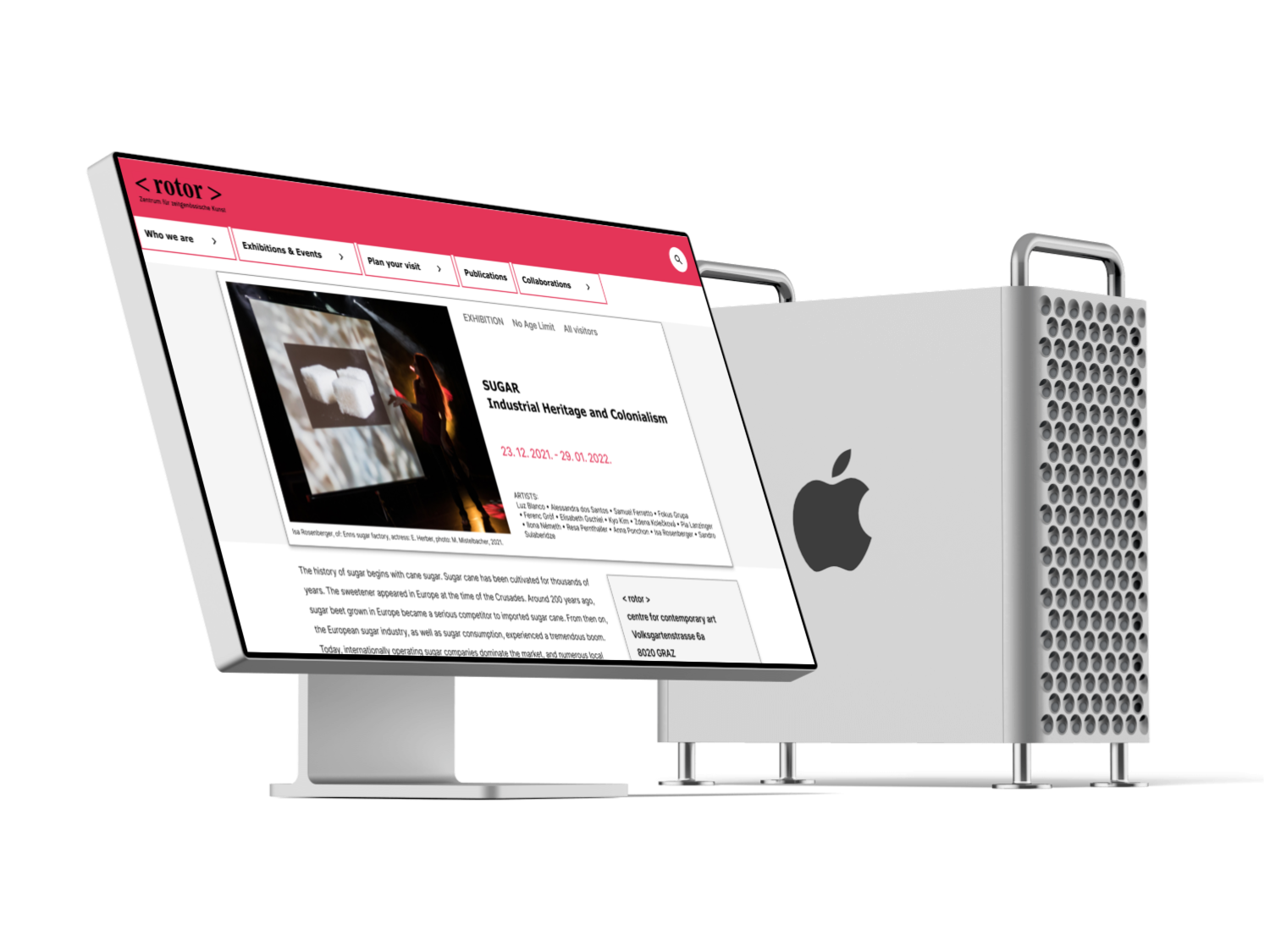
For representatives of all target groups, the most important content on an art organisation’s website is information about current activities. They are also interested in upcoming events and value clear mission and vision statements, as well as a concise description of what the organisation stands for.
Artists and other art organisation’s representatives stated that content about former activities is also important to them and that an art organisation’s website should have an archive of past activities.
In addition to all of the above, artists need information about practicalities such as exhibition space layout, equipment specifications and open calls in progress.
Representatives of art organisations and sponsors look additional for information about the team, partners, and contacts. The general public, besides current activities, expects practical details like opening hours, ticket options, directions, and contact info.
The target groups’ representatives defined good websites practices as follows:










Check for more detailed

Mental Model Diagrams
The next step in the research was to map the target users’ thought processes and identify relevant content for Rotor’s website relaunch. To do this, I created a Mental Model Diagram for each target group.
Mental models are, in essence, affinity diagrams’ of user behaviors. From there, I was able to analyze the content structure and to define the content model – a description of all the content that the new content management system (CMS) is expected to handle and which serves as a solid foundation for the new modular-based UI.
Creating a Mental Model Diagram

SETTING THE RESEARCH SCOPE
The scope of my research was:
To translate content concepts derived from mental model diagrams of Rotor’s target groups into a domain model for the website relaunch.

SETTING RESEARCH GOALS
Based on the defined scope of my user research, I established specific research goals and identified key business objectives, outlined as follows:
| GOAL | KEY BUSINESS OBJECTIVES |
| Define content concepts important for contemporary visual artists | Provide content concepts for developing a domain model of Rotor’s website based on artists’ needs. |
| Define content concepts important for representatives of other art organizations & sponsors | Provide content concepts for developing a domain model for Rotor’s website based on other art organizations & sponsors’ needs. |
| Define content concepts important for the interested community | Provide content concepts for developing a domain model of Rotor’s website based on the needs of the interested community. |

SETTING RESEARCH GOALS
The next step was to identify specific scenarios for each target group to provide a reference point for building a mental model.
| TARGET GROUP | SCENARIO |
| Contemporary visual artists | A contemporary visual artist plans & organizes an art exhibition to present his/her work. |
| Other art organizations & sponsors | A representative of an art organization/institution is looking for a partner to collaborate on a new project. |
| Interested community | A visitor is looking for an interesting contemporary art exhibition & plans to visit it. |

ANALYSING THE TRANSCRIPTS
Combing for tasks – Tables with interviews’ retrieved segments performed by MAXQDA with deduced conclusions – affinity diagrams were used as a base for further work and research.

CREATING A TASKS LIST
To have a clear overview of all tasks and accompanying quotes per each target group and interviewed participants, I created a separate document with task lists.

LOOKING FOR PATTERNS & GROUPING
I started by finding tasks that were similar to each other, comparing them, looking for patterns, and grouping them – Artists’ atomic tasks grouped into patterns example.

CREATING STRUCTURE FOR THE MENTAL MODEL DIAGRAMS
After analyzing tasks to identify patterns, I developed structures consisting of layer tasks, towers, and mental spaces, accompanied by a legend to improve the clarity of the mental model diagram. Contemporary artist example:

BUILDING MENTAL MODEL DIAGRAMS
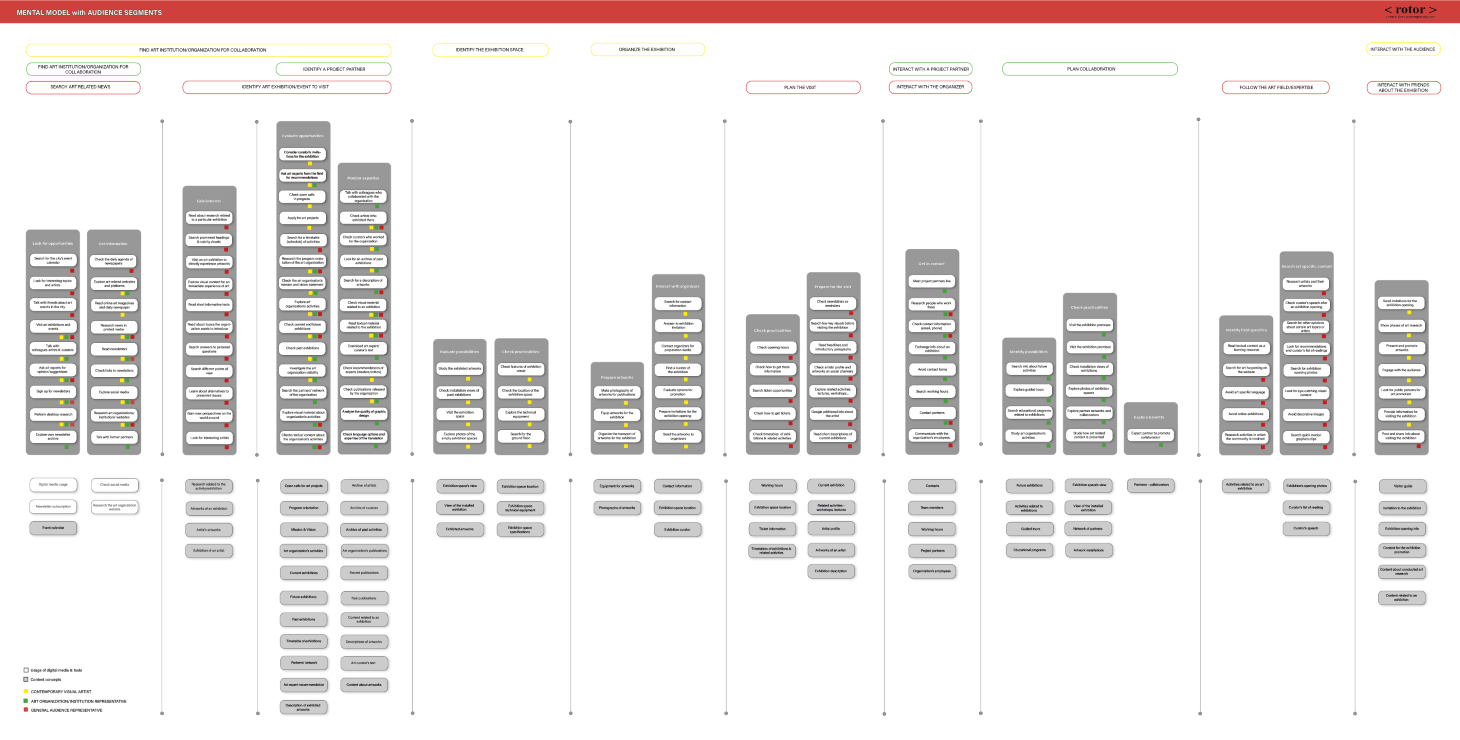
The next step was to visualize tasks, towers, and mental spaces in a diagram format. This resulted in mental model diagrams for each Rotor‘s target group, along with a summary diagram encompassing all audience segments.

DEFINING CONTENT CONCEPTS
Mental models are used to align existing and planned product features beneath concepts that people mentioned in the towers. However, in the Rotor’s case, my goal was to identify content concepts by analyzing the tasks defined in the towers. This process aimed to define objects for the Rotor’s domain model.
The content concepts outlined in the lower half of the Mental Model Diagrams—serving as the foundation for defining a conceptual model of Rotor’s subject domain—are as follows:
- event calendar
- artworks of an exhibition
- artist’s artworks
- exhibition of an artist
- open calls for art projects/exhibitions
- program orientation
- mission & vision statement
- art organization activities
- current exhibitions
- future exhibitions
- past exhibitions
- timetable of exhibitions
- partners’ network
- art expert recommendation
- description of exhibited artworks
- archive of artists
- archive of curators
- archive of past activities
- art organization’s publications
- recent publications
- past publications
- content related to an exhibition
- content about artworks
- art curator’s text
- exhibition space’s view
- view of the installed exhibition
- exhibited artworks
- exhibition space location
- exhibition space technical equipment
- exhibition venue specifications
- equipment of artworks
- images of artworks
- contact information
- ticket information
- timetables of exhibitions & related activities
- related activities – workshops, lectures
- artist profile
- exhibition description
- team members
- working hours
- project partners
- organization’s employees
- activities related to an art exhibition
- guided tours
- educational programs
- exhibition space’s view
- view of the installed exhibition
- network of partners
- artwork installation
- partners – collaborators
- exhibition’s opening photos
- curator’s list of reading
- exhibition opening info
- content for the exhibition promotion
- curator’s speech
- visitor guide
- invitation to the exhibition
- content about conducted art research
DEFINE
CONTENT STRATEGY
Product Concept Statement
In the next phase of project development, I met with key representatives of the Rotor association to establish a foundation for implementing the strategy. After an extensive meeting and discussion about the issues identified in the previous phase, we developed the Product Concept Statement—a vision statement that served as the basis for identifying high-level needs, requirements, and design which is addressed to all stakeholders.
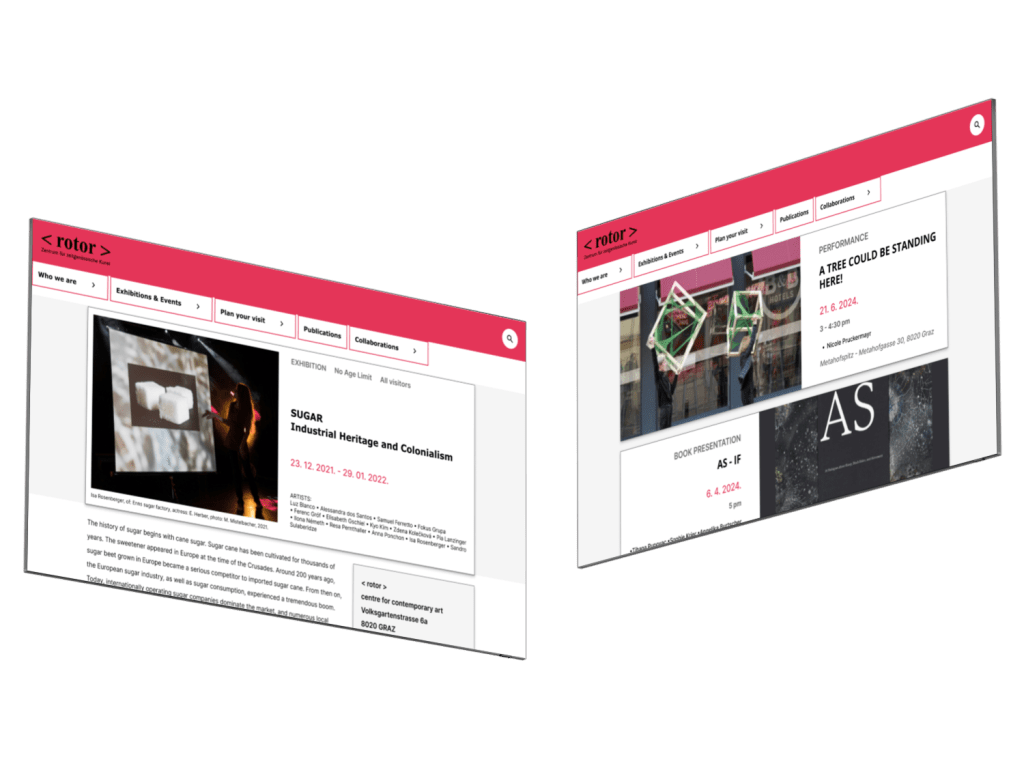
The product is the website for the Association for Contemporary Art <rotor>, which provides all target audiences with an overview of the organisation’s activities.
The service includes access to the organisation’s profile information as well as to subject domain content defined by the content model. Content is modular, structured, reusable and semantically rich. Implementing the content model and “intelligent” content approach will serve as the foundation for developing a component-based modular UI.
The website is responsive, adapted to the user’s context and it enables easy content distribution on social media channels and vice versa.
The final result will enhance the visibility of Rotor’s activities on the network, raise awareness about contemporary visual art and increase audience engagement.
A focus on innovative design will enhance Rotor’s public profile while fostering the spirit of the Rotor community and offering users and content authors a quality experience.
Structuring Content – Subject Domain Model “Exhibition”
The content concepts outlined in the lower half of the mental model diagrams served as the foundation for defining a conceptual model of Rotor’s subject domain.
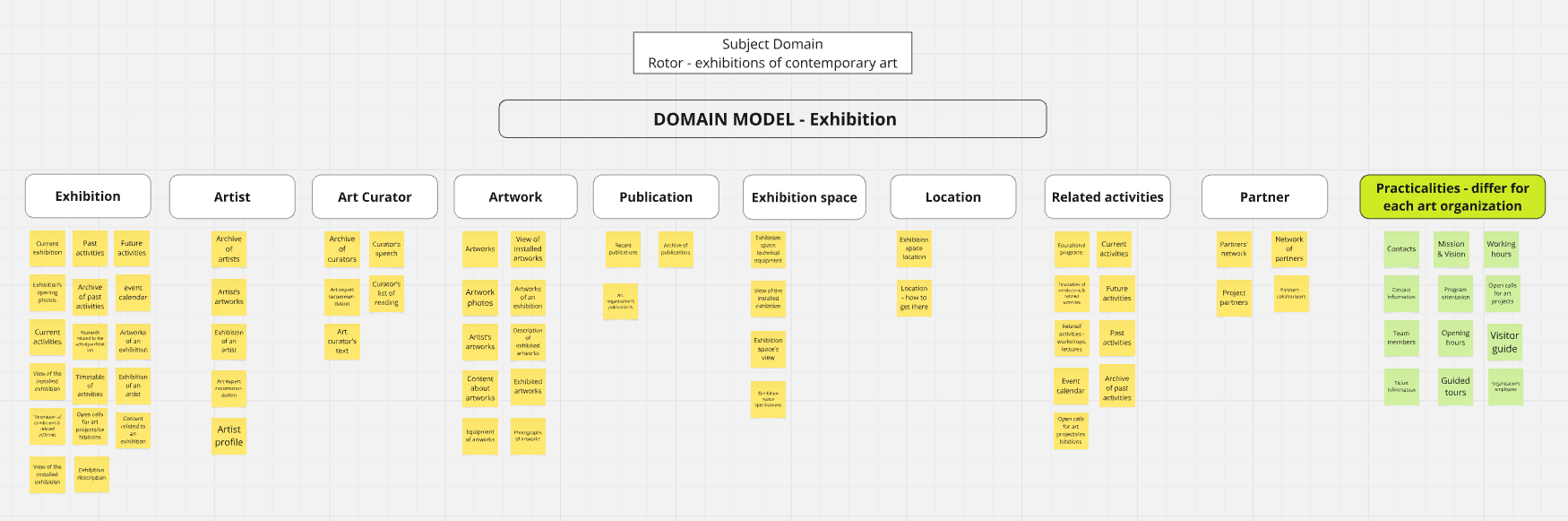
By categorizing and organizing these content concepts, I identified key content objects within the subject domain that are valuable to Rotor’s audience.
EXHIBITION
ARTIST
ART CURATOR
ARTWORK
PUBLICATION
EXHIBITION SPACE
LOCATION
RELATED ACTIVITY
PARTNER
After identifing key content objects within the subject domain I moved on to content modeling.
The goal was to show the key objects within that domain and the relationships between them. The end result that was derived was the domain model for Rotor.
The domain model “Exhibition” emerged as the most important for an art organization’s subject domain, directly addressing the needs of its target audience. This model would serve as the foundation for the future CMS and UI design planning for the website relaunch.
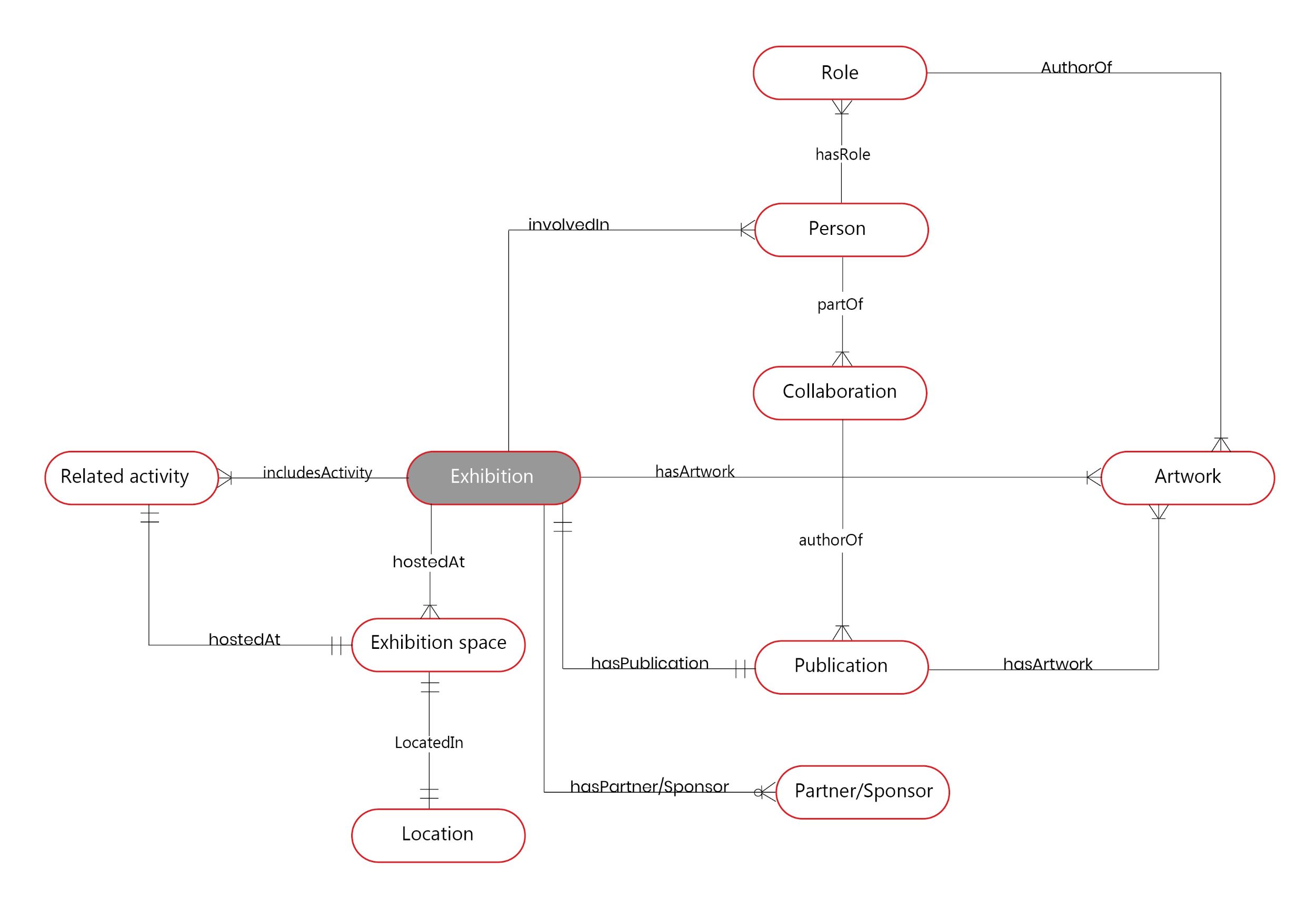
Drafts of defining the the Domain Model “Exhibition” – check Miro Board
Domain Model “Exhibition”
An Exhibition (individual, group, performance, action…) has one or many Persons involved. The Person can have one or many Roles (curator, artist, author…). The Person is also involved in one or more Publications and a Publication can have one or more authors working on it. Due to this, the Collaboration domain object was introduced. One Person can be a part of one or more Collaborations. One Collaboration can work on one or more Publications. The Person (in the role of Artist) can be the author of one or more Artworks.
The Exhibition has one or more Artworks. An Exhibition has one Publication. Each Publication presents one or more Artworks. The Exhibition is hosted in one or more Exhibition spaces and each Exhibition space has one Location.
An Exhibition has one or more Related activities (workshop, lecture…) which are boundary objects that need a Domain Model for themselves. Each Exhibition has zero, one or more Partners with whom a cooperation is established.
Content Modelling
“Where a domain model maps the world, a content model focuses on the structure and content you’ll actually publish.” (Atherton & Hane, 2018)*
A content model provides structure to the objects that were mapped in the domain model and consists of;
- types of content we have
- their attributes
- and relationships
A content model typically ends up being documented in a diagram that can get translated to a database and CMS structure.
Content Types
“Content type is a reusable container that describes the consistent form of similar content.” (Atherton & Hane, 2018)**
As I moved from the abstract to the specific, domain-model objects became content types with assigned attributes. Shifting from concept definitions to attributes can reveal gaps, redundancies, and unnecessary objects. Sometimes, what seems like a separate concept is just an attribute. A content type is truly useful only if it is reusable.
After the domain model was created, the project team joined again and discussed single objects of it. The aim was to pick those domain objects and relationships that make sense for Rotor to address.
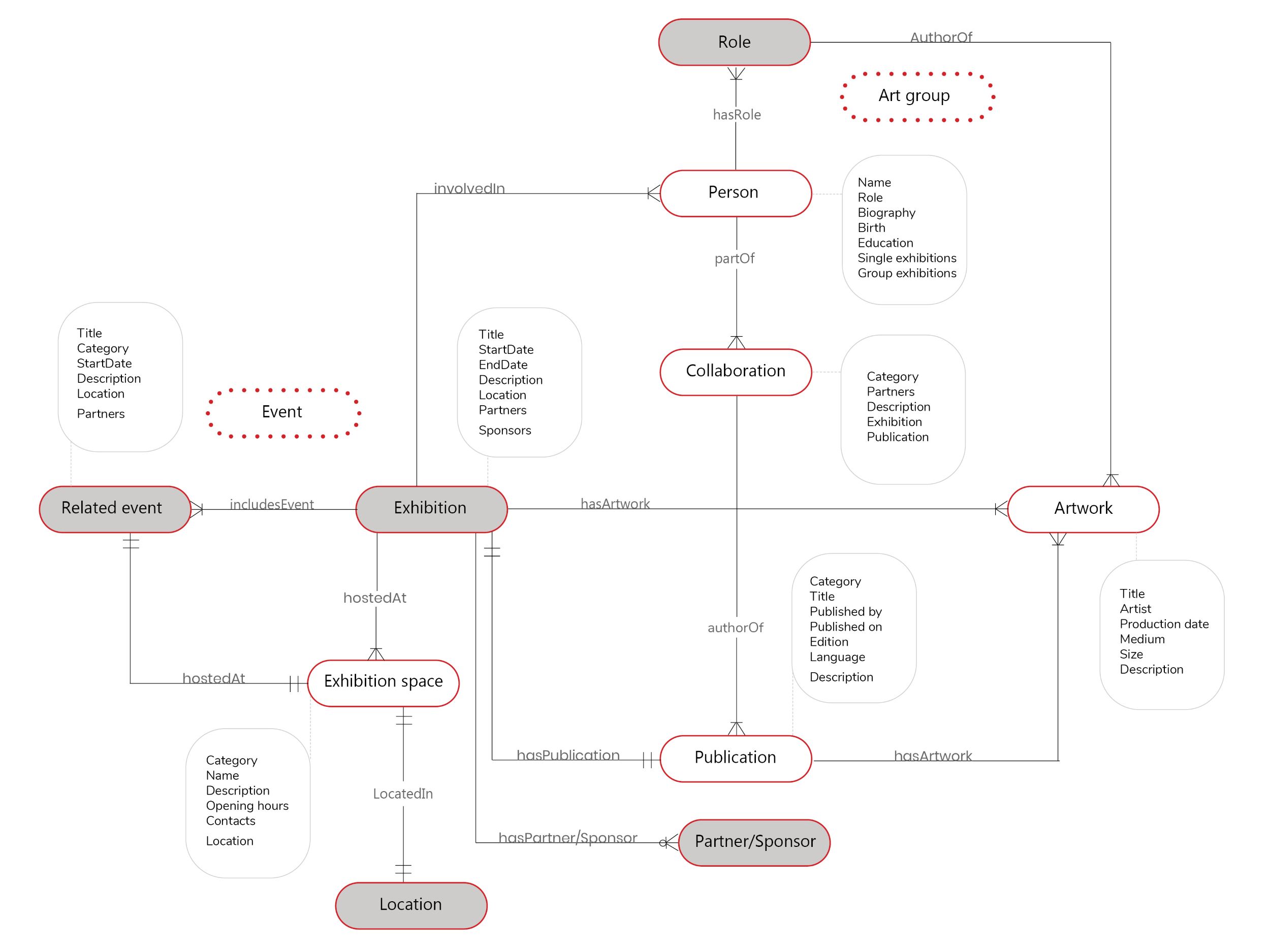
The following domain objects were further adapted:
- The domain objects Location and Role were put aside because they were more like attributes to other objects and have no useful attributes themselves.
- The objects Exhibition and Related Event share many attributes. When we think about it, we could argue that an exhibition is an event but with a longer duration. In the CMS, it should be possible to define different event categories and their connections. A category could then be used to display all events of a specific type.
- Rotor’s directors highlighted the importance of the Collaboration domain object and requested to link it with the Event object. They maintain a broad network of partners and engage in various types of collaborations, especially when planning and organizing activities. Additionally, they have existing content for this domain object.
- The object Art Group was introduced because very often a group of authors takes part in an exhibition or event under a specific name.
From the original domain model, with 10 objects, we ended up with 7 content types.
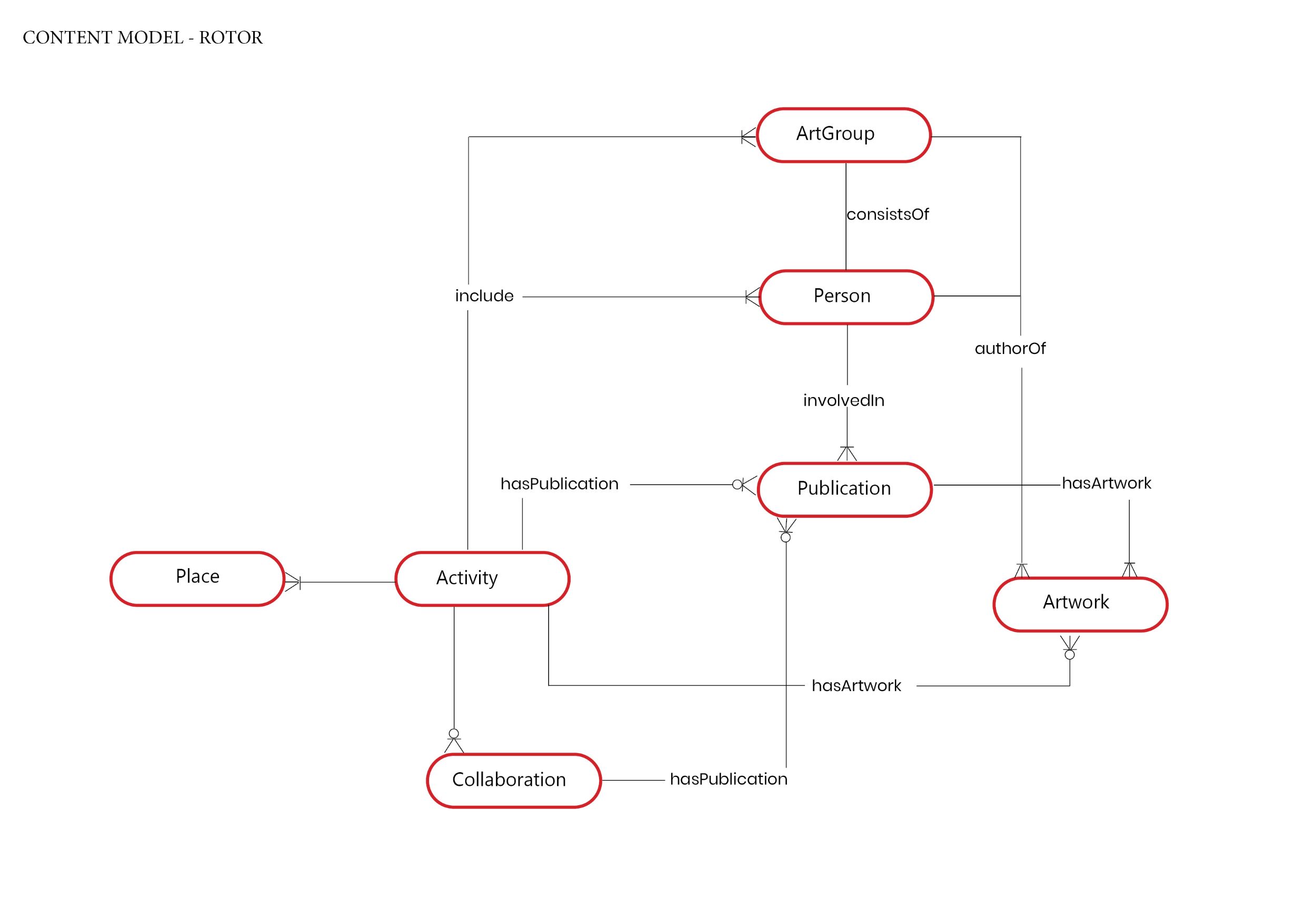
* Some content objects, like the About or Contact pages, will appear on the Rotor website but are not included in the model as specific content types. The focus is on representing real-world and user-relevant concepts and connections, not a full content inventory.
Content Type Attributes
After identifying which objects of the domain model will serve as content types, I began describing them. Defining attributes of these content types is the essence of the content model.
Each attribute should be supported by relevant content. When working with each content type, the goal was to consider how it might connect to other domains and identify the attributes needed to establish those connections. The ultimate objective was to prepare the content for the future.
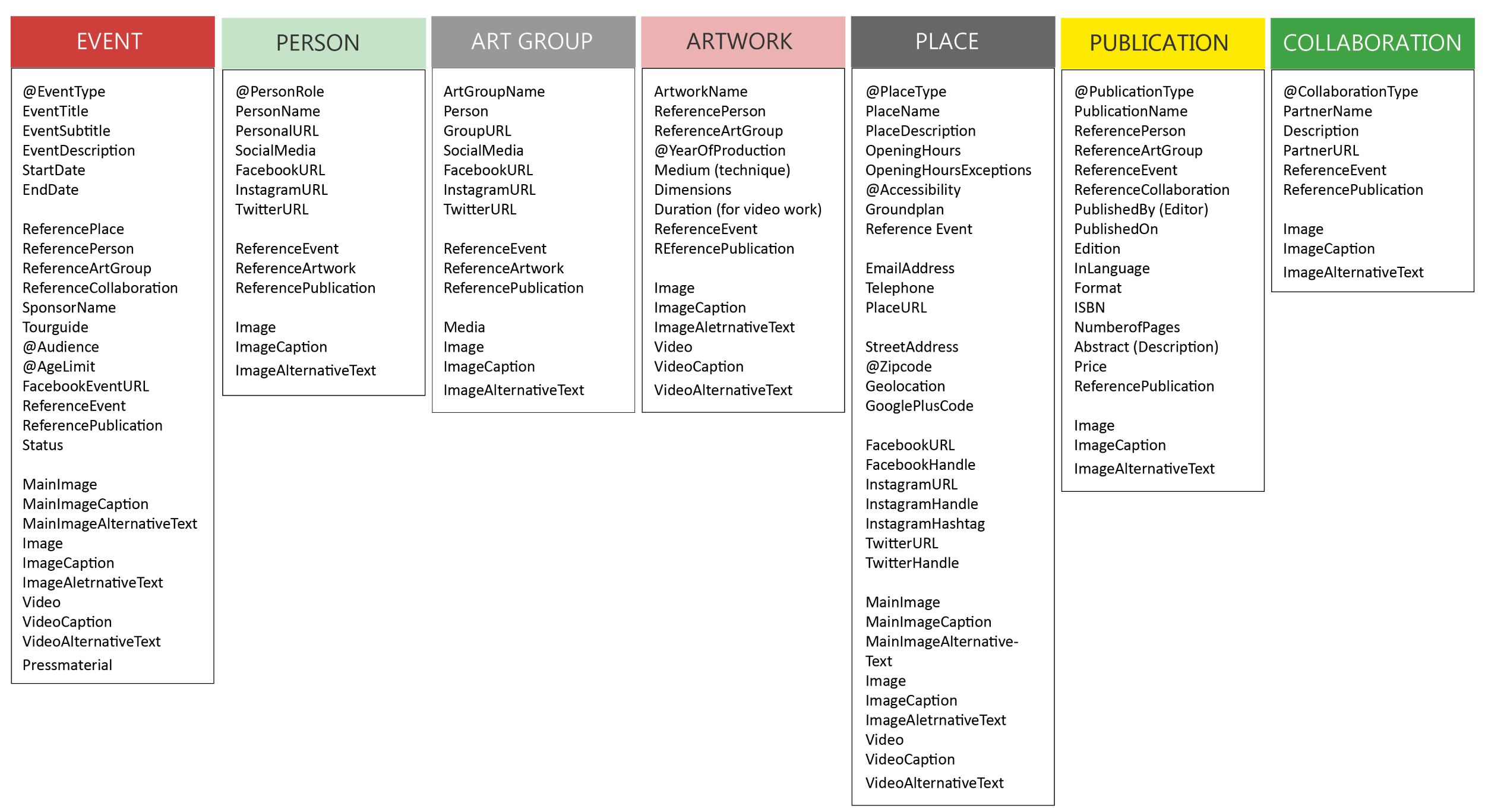
Taxonomies & Metadata – Categories for Rotor
By defining content structure and modular content, I’ve already started creating semantically rich content.
The process of creating taxonomies for the organization began with domain modeling, where I structured the domain, described key elements of the subject domain, and defined the relationships between them.
A taxonomy organizes information, implies structure, and establishes controlled terminology. It can include metadata that allows us to organize, categorize, and relate content effectively.
“Consistent language contributes to a professional, reliable experience, both for internal teams and end users.” (Martin, 2019)***
Categories help classify information, ensure consistent vocabulary for authors, and enable users to track content intuitively.

Content Type Templates
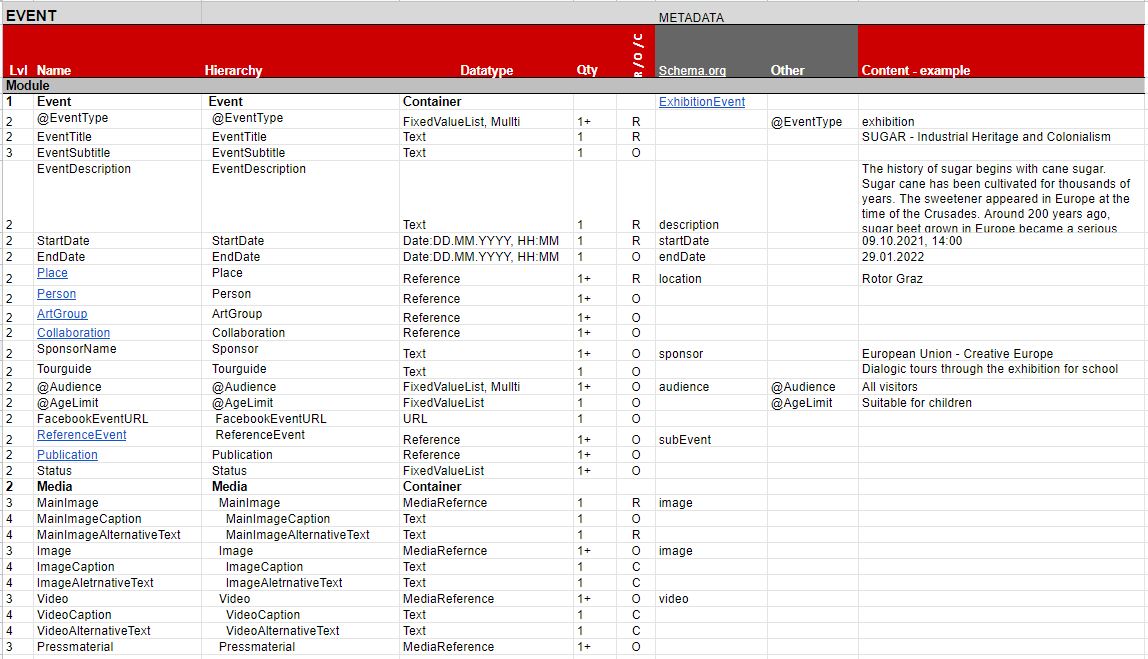
I used a spreadsheet to organize all content types, customized for Rotor to capture attributes and technical specs. The resulting content model is a key reference, typically handed off to designers and developers to inform them of content details and constraints.
The greatest benefit of this process is the ability to address and, if necessary, revise the content structure at an early stage. While editorial processes are underway, the design and development teams can begin working on the structure and visual layout.
DEVELOP
UX DESIGN
Content Flow Templates
Component based UI Design
Content can appear in many places, so we should never assume it has only one destination. By breaking content into components and defining its structure, we make it ready for reuse.
Modular components are auditable, allowing us to track where, when, and by whom they’ve been used.The following content flow templates—based on the content type templates—demonstrate how modular content works and how it can be easily reused in different parts of the final product.

plates
Visualization of the <event> content type shows how attributes can be extracted and reused in different content templates for the Rotor’s website relaunch. Each content type is represented with a different colour.
All attributes defined for each content type are displayed somewhere on the website. In the CMS, they are organized separately in chunks but connected through categories and links. The following basic content templates illustrate how content elements from different content types are combined, with each color representing a specific content type.
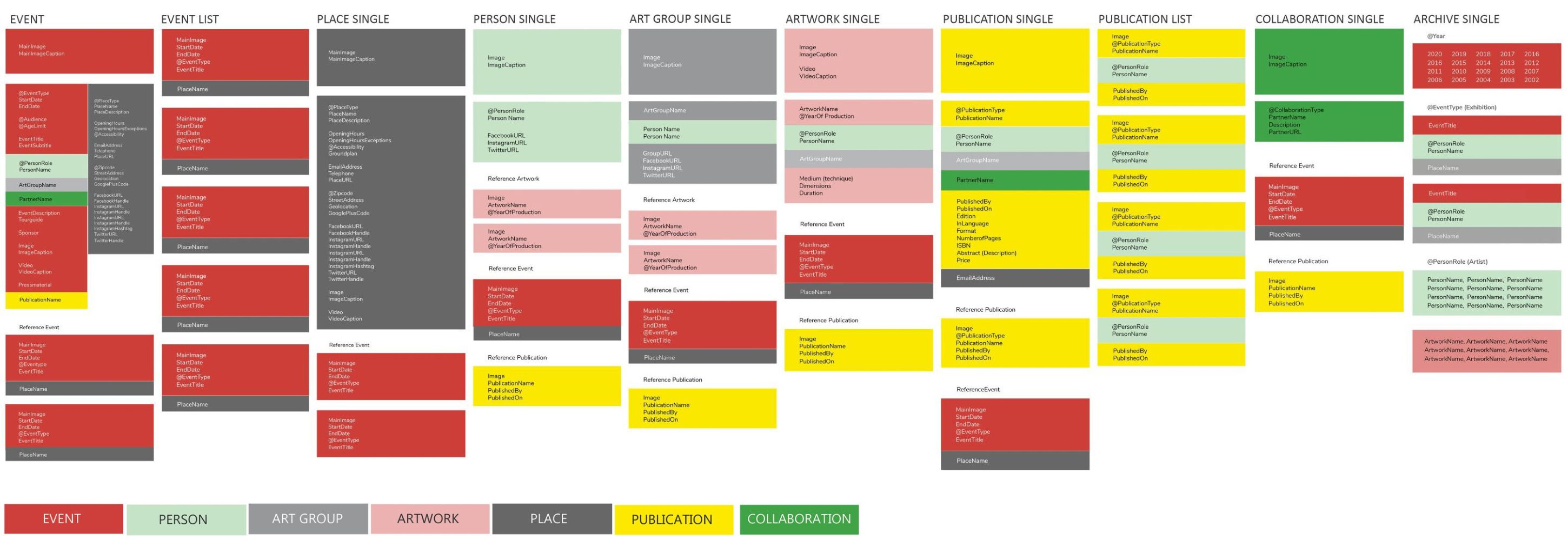
In my case, content type and content flow templates serve as the foundation for CMS planning and UI design, helping to create intuitive, future-friendly products that meet user needs.
New Global Navigation
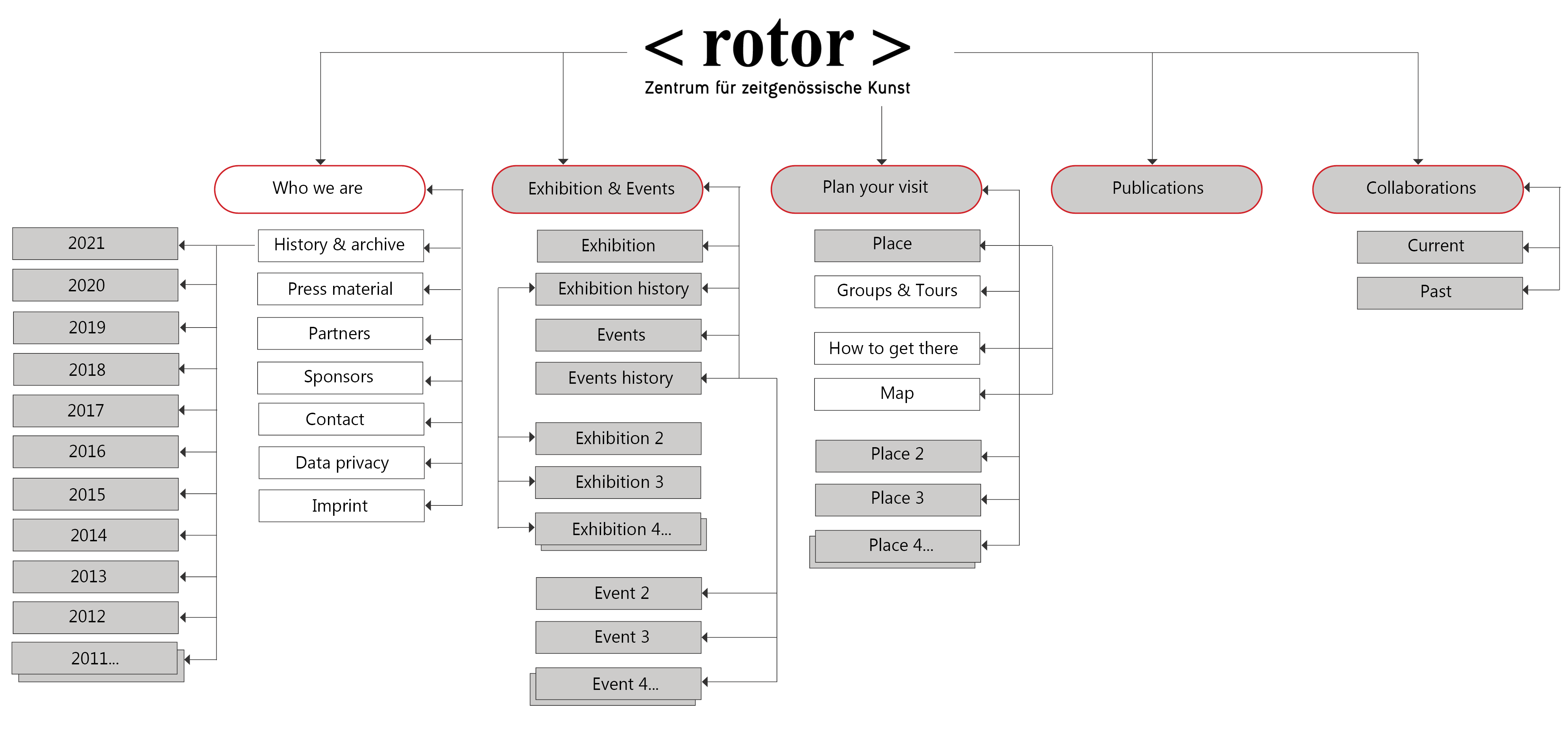
By designing global navigation around core content types, defined taxonomies, and metadata, we can provide direct access to the content visitors need on the website.
The following image presents a proposed global navigation for Rotor’s website relaunch. While the navigation items are primarily based on core content types, the proposal also includes additional items, such as Who We Are (About Us).
In the foloowing figure, white sections represent custom-curated pages or pages with unique content structures that don’t require modeling beyond a single page. Grey sections indicate items mapped from the previously shown content flow templates back to the information architecture.
DELIVER
UI DESIGN
Low & High Fidelity Prototypes
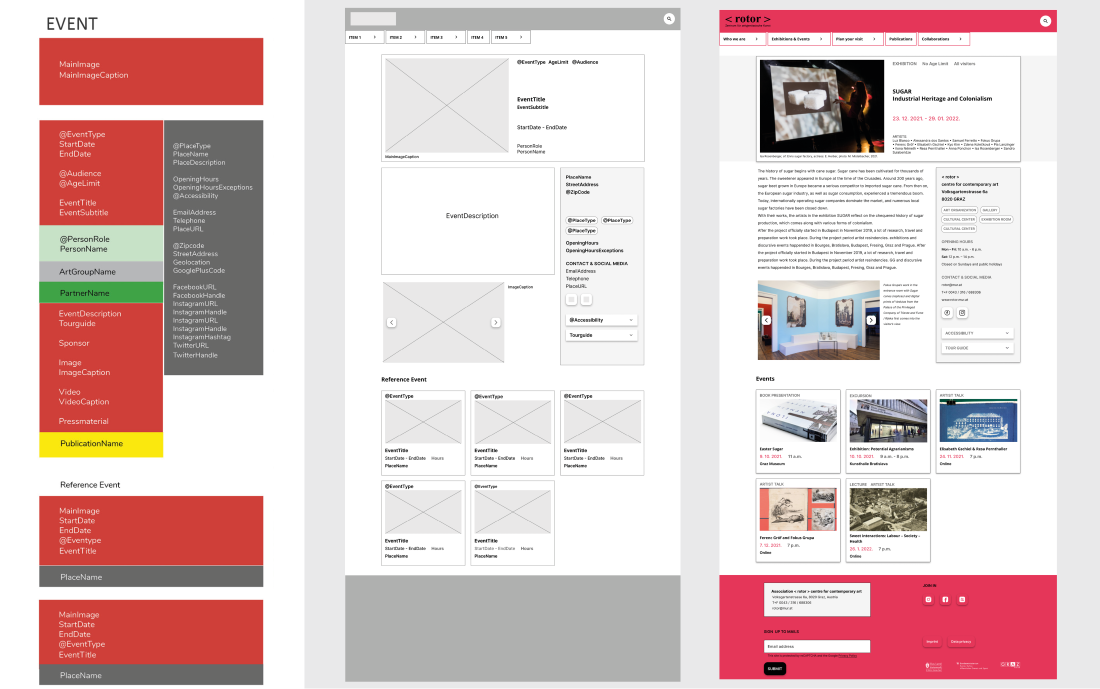
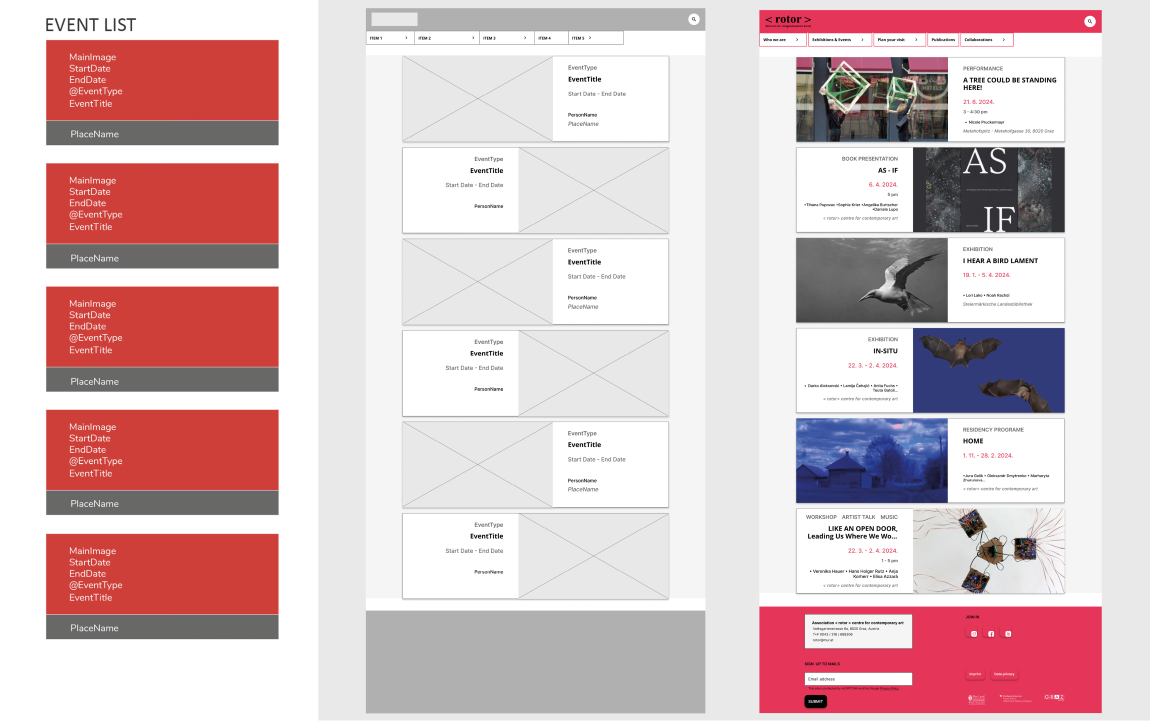
Previously defined content templates for different pages served as a starting point for developing a component-based modular UI design—beginning with low-fidelity prototypes and followed by high-fidelity prototypes.
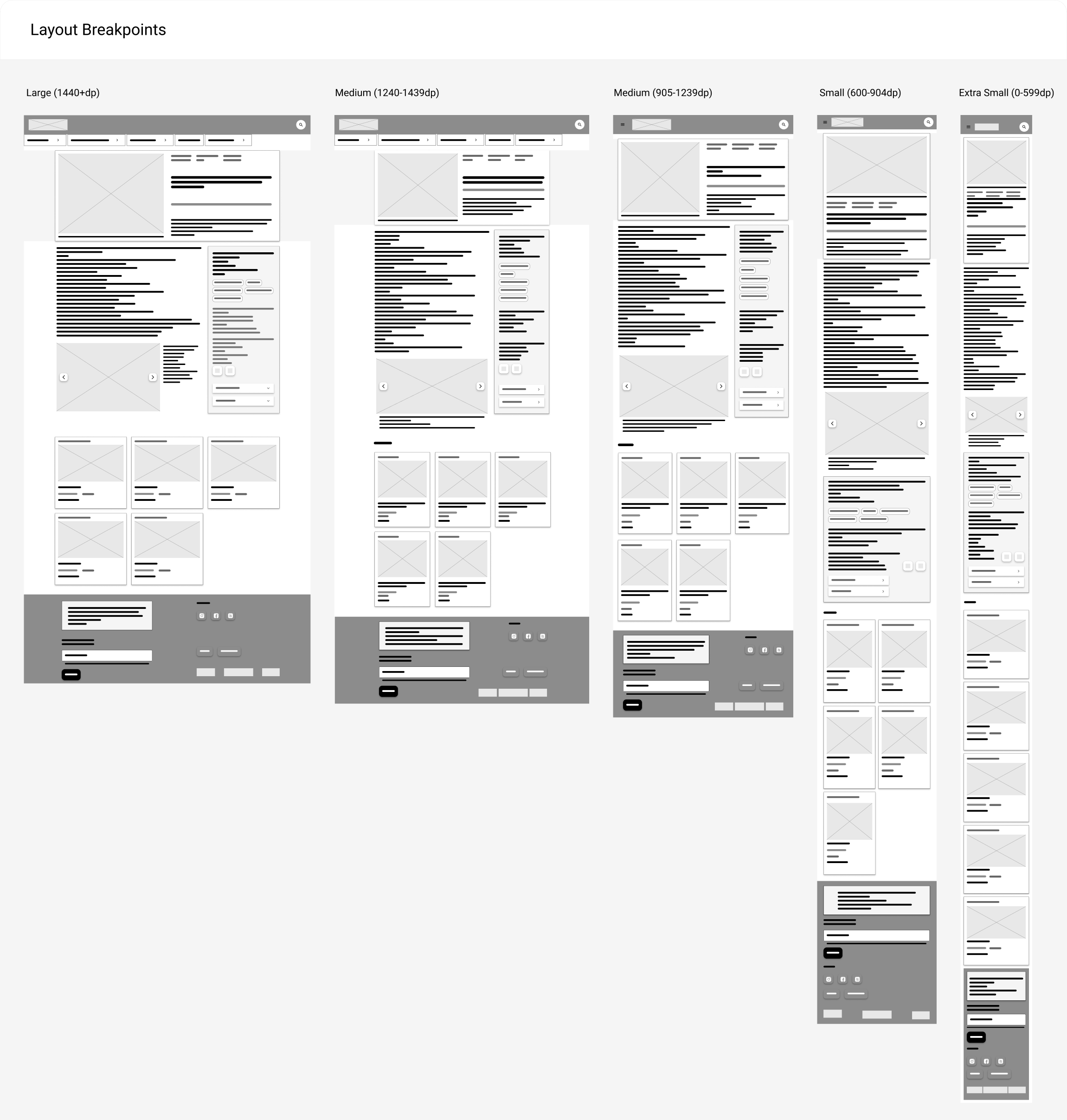
Responsive Design
By having well-structured content and well-designed chunks of content, we can easily determine how to restructure, publish, and display it in a way that looks and functions beautifully across various screen sizes and environments. The low and high-fidelity prototypes showcase the pages for the website relaunch, providing solutions for multi-device web experiences.

* / ** Hane, C., & Atherton, M. (2018). Designing Connected Content: Plan and Model Digital Products for Today and Tomorrow. New Riders.
*** Martin, L. M. (2019). Everyday Information Architecture. Jeffrey Zeldman.
 BenSan Design